
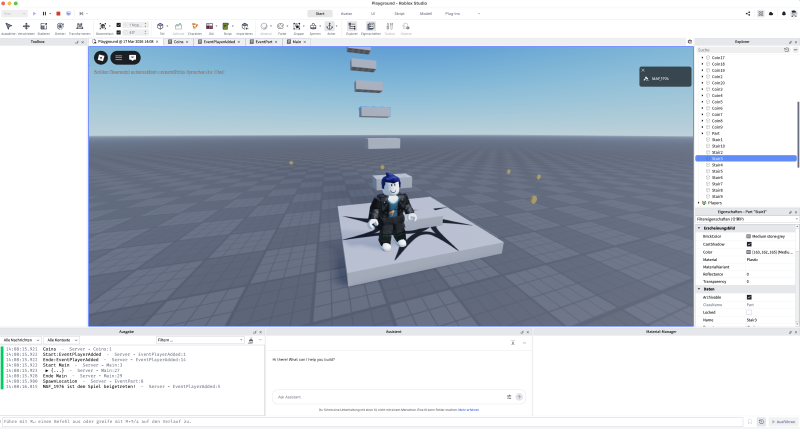
Intro #
Roblox Studio is the development environment used to build all games on the Roblox platform. Here you’ll learn how to create your own games - from the 3D world to game mechanics.
The programming language is Luau, an evolution of Lua specifically optimized for Roblox. Compared to other languages, Lua is lean and easy to read - a good starting point for programming.
Studio #
Controls #
| Key(s) | Function |
|---|---|
| W A S D | forward, left, back, right |
| E Q | |
| right mouse button | |
| mouse wheel | zoom |
| CTRL+D | duplicate |
| F2 | rename |
| F5 | run |
| Shift+F5 | stop |
| CTRL+S | save |
| F9 | Developer Console |
Explorer #
Workspace #
Contains most of the objects (Part, Baseplate, SpawnLocation, …) of a world (Experience).
Written with a capital “W” in Roblox Studio, but in scripts you use workspace. Also available as game.Workspace.
Properties #
Allows you to view and adjust the properties (attributes / parameters) of an object (from the Explorer).
Part #
Add and manipulate a Part: Select, Move, Scale, Rotate, …
Script types #
| Type | Where | What for |
|---|---|---|
Script |
ServerScriptService | game logic affecting all players |
LocalScript |
StarterPlayerScripts StarterGui |
game logic only for the local player |
ModuleScript |
anywhere | reusable code |
Important locations #
| Folder | Script type | Runs on | Visible to |
|---|---|---|---|
ServerScriptService |
Script |
Server | all players |
StarterPlayerScripts |
LocalScript |
Client | only that player |
StarterGui |
LocalScript |
Client | only that player |
StarterCharacterScripts |
LocalScript |
Client | only that player |
ReplicatedStorage |
ModuleScript |
Both | Server & Client |
ServerStorage |
ModuleScript |
Server | server only |
Server vs. Client #
Server (ServerScriptService)
-- ✅ can save player data (DataStore)
-- ✅ manages game logic (score, lives)
-- ✅ secure – players can't manipulate it
-- ❌ no access to the player's GUI

Client (StarterPlayerScripts / StarterGui)
-- ✅ can control the GUI
-- ✅ reacts to key input (UserInputService)
-- ✅ smoother animations & effects
-- ❌ insecure – can be manipulated by players
Typical example
LocalScript in ServerScriptService
-- ❌ WRONG: doesn't run at all!

Script in StarterGui
-- ❌ WRONG: runs, but can't access the GUI

Manage score on the server
-- ✅ CORRECT: ServerScriptService/Script:
local Players = game:GetService("Players")
Players.PlayerAdded:Connect(function(player)
    local leaderstats = Instance.new("Folder")
    leaderstats.Name = "leaderstats"
    leaderstats.Parent = player
end)

Detect a key press on the client
-- ✅ CORRECT: StarterPlayerScripts/LocalScript:
local UIS = game:GetService("UserInputService")
UIS.InputBegan:Connect(function(input)
    if input.KeyCode == Enum.KeyCode.E then
        print("E pressed!")
    end
end)
Communication between server & client #
Since server and client are separate, you need RemoteEvents:
-- In ReplicatedStorage: a RemoteEvent named "AddPoints"

-- CLIENT sends a request:
local event = game.ReplicatedStorage.AddPoints
event:FireServer(10)

-- SERVER receives it:
event.OnServerEvent:Connect(function(player, points)
    print(player.Name .. " gets " .. points .. " points")
end)
💡 Rule of thumb: Game logic & data storage → Server. GUI & input → Client. Shared code → ReplicatedStorage.
Multiple scripts in the same folder #
Scripts run in parallel and independently. All scripts in a folder start simultaneously at game start – there is no defined order.
-- Script A
print("I am Script A")  -- may appear before or after B!
-- Script B
print("I am Script B") -- order not guaranteed!Do they share variables? ❌ no – each script has its own memory
-- Script A:
local score = 100  -- only visible in Script A
-- Script B:
print(score) -- Error! score doesn't exist hereHow do scripts communicate with each other? #
Way 1: Via an object in the world
Create MyFolder (Folder) and Value (IntValue) beforehand under Workspace. The value isn’t persistent, it falls back to its original value. Depending on timing, the original value will be used.
ScriptA and ScriptB under ServerScriptService.
-- Script A writes:
workspace.MyFolder.Value.Value = 42
-- Script B reads:
print(workspace.MyFolder.Value.Value) -- 42Way 2: ModuleScript (recommended)
ModuleScript Data in ReplicatedStorage. ScriptA and ScriptB under ServerScriptService. Here too the value isn’t persistent and timing matters.
-- ModuleScript "Data" in ReplicatedStorage:
local Data = {}
Data.score = 0
return Data
-- ScriptA:
local Data = require(game.ReplicatedStorage.Data)
Data.score = 100-- ScriptB:
local Data = require(game.ReplicatedStorage.Data)
print(Data.score) -- 100Way 3: BindableEvents (for server-to-server)
ScriptA and ScriptB as Script under ServerScriptService. MyEvent as BindableEvent under ServerScriptService.
-- ScriptA fires an event:
local event = game.ServerScriptService.MyEvent
event:Fire("Hello Script B!")
-- ScriptB listens:
local event = game.ServerScriptService.MyEvent
event.Event:Connect(function(message)
print(message) -- "Hello Script B!"
end)Luau #
Roblox’s own Lua variant.
- Create a script
- in the
Explorerpanel, click the + next to the object (e.g.ServerScriptService) - select or search for the object →
Script(server-side) orLocalScript(client-side)
- Open the script
- double-click the script → the code editor opens
Basic syntax #
Comment #
-- Line

print("Hello") -- Inline

--[[
Block
]]
Variables #
local name = "Player"
local score = 0
Conditions #
if score > 10 then
    print("Well done!")
end
Loops #
for i = 1, 5 do
    print(i)
end
Functions #
local function sayHello(name)
    print("Hello, " .. name)
end
sayHello("World")
Important Roblox objects #
-- Find players
local players = game:GetService("Players")

-- Create a part
local part = Instance.new("Part")
part.Parent = workspace
part.Position = Vector3.new(0, 10, 0)

-- Use events
players.PlayerAdded:Connect(function(player)
    print(player.Name .. " has joined!")
end)
Naming conventions #
Variables & functions #
→ camelCase
local playerName = "Max"
local totalScore = 0

local function getUserData(playerId)
    -- ...
end
Constants #
→ SCREAMING_SNAKE_CASE
local MAX_PLAYERS = 10
local SPAWN_POSITION = Vector3.new(0, 5, 0)
local GAME_VERSION = "1.0.0"
Classes / modules / services #
→ PascalCase
local PlayerService = {}
local InventoryManager = {}

-- Roblox Services (already named this way)
local RunService = game:GetService("RunService")
local TweenService = game:GetService("TweenService")
Roblox objects (instances) #
→ PascalCase
local MyPart = Instance.new("Part")
local SpawnFolder = workspace:FindFirstChild("Spawns")
Private fields in modules #
→ _underscore prefix
local MyModule = {}

local _privateData = {}  -- used internally only

function MyModule.publicFunction()
    -- ...
end

return MyModule
Overview #
| Type | Convention | Example |
|---|---|---|
| Local variable | camelCase |
playerHealth |
| Function | camelCase |
calculateDamage() |
| Constant | UPPER_SNAKE_CASE |
MAX_SPEED |
| Class / module | PascalCase |
WeaponSystem |
| Roblox instance | PascalCase |
BasePart |
| Private field | _camelCase |
_internalState |
For #
Numeric #
-- for i = start, end, step do
for i = 1, 10 do
    print(i)          -- 1, 2, 3 ... 10
end

for i = 1, 10, 2 do
    print(i)          -- 1, 3, 5, 7, 9
end

for i = 10, 1, -1 do
    print(i)          -- 10, 9, 8 ... 1
end
Generic (over tables) #
-- ipairs: array, with index, stops at nil
for index, value in ipairs(myArray) do
    print(index, value)
end

-- pairs: all entries, including mixed keys
for key, value in pairs(myDictionary) do
    print(key, value)
end

-- Modern (Luau): without ipairs/pairs
for value in myArray do
    print(value)
end
Comparing ipairs vs pairs #
local t = {
    "Apple",          -- [1]
    "Banana",         -- [2]
    name = "Fruit",   -- string key
    "Cherry",         -- [3]
}

for i, v in ipairs(t) do
    print(i, v)   -- 1 Apple, 2 Banana, 3 Cherry
end               -- ⚠️ name="Fruit" is ignored!

for k, v in pairs(t) do
    print(k, v)   -- everything, including name="Fruit"
end               -- ⚠️ order not guaranteed!
Breaking out of a loop #
for i = 1, 100 do
    if i == 5 then
        break   -- exit the loop immediately
    end
    print(i)    -- 1, 2, 3, 4
end
💡
continuehas existed in Luau since 2022:continuejumps to the next iteration withoutbreak.
Lifetime of variables #
Only within the block — after that they’re gone:
for i = 1, 5 do
    local x = i * 2  -- x only exists here
    print(x)         -- works
end

print(x)  -- nil! x no longer exists
print(i)  -- nil! i is also gone
This applies to all blocks in Lua — for, while, if, do...end. As soon as the block ends, its local variables are released.
To keep the value afterwards, the variable must be declared beforehand:
local result
for i = 1, 5 do
    result = i * 2  -- writes to the outer variable
end
print(result)  -- 10
GetChildren vs GetDescendants #
-- only Parts from the same level
for _, child in script.Parent:GetChildren() do
	if child:IsA("Part") then
		print(child.Name)
	end
end

-- Part and Sub/PartSub from deeper levels
for _, child in script.Parent:GetDescendants() do
	if child:IsA("Part") then
		print(child.Name)
	end
end
If #
Basic structure #
if condition then
    -- code
elseif otherCondition then
    -- code
else
    -- code
end
Comparison operators #
the syntax for “not equal” ~= is very unusual.
if x == 10 then   -- equal
if x ~= 10 then   -- not equal (not != like in other languages!)
if x > 10 then    -- greater than
if x < 10 then    -- less than
if x >= 10 then   -- greater than or equal
if x <= 10 then   -- less than or equal
Logical operators #
if x > 0 and x < 10 then    -- and
if x < 0 or x > 10 then     -- or
if not x then                -- not
Truthy / Falsy #
In Luau only false and nil are falsy – everything else is truthy, which is also unusual:
if 0 then print("true") end       -- ✅ 0 is truthy! Very unusual!
if "" then print("true") end      -- ✅ empty string is truthy! Very unusual!
if nil then print("true") end     -- ❌ nil is falsy
if false then print("true") end   -- ❌ false is falsy
Shorthand for a nil check #
local part = workspace:FindFirstChild("MyPart")

-- Both are equivalent:
if part ~= nil then print("found") end
if part then print("found") end          -- shorter
Ternary operator #
local x = if y == 10 then "yes" else "no"Comment #
-- Line

print("Hello") -- Inline

--[[
Block
]]
Classes #
Game #
tbd
game.Workspace #
see Workspace
Instance #
Create and manipulate objects (instances).
Part #
local newPart = Instance.new("Part")
newPart.Name = "NewPart"
newPart.Parent = workspace
Math #
random #
while true do
	local r, g, b = math.random(0, 255), math.random(0, 255), math.random(0, 255)
	print(r, g, b)
	workspace.Part.Color = Color3.fromRGB(r, g, b)
	task.wait(0.1)
end
Workspace #
also workspace, game.Workspace, game:GetService("Workspace")
https://create.roblox.com/docs/en-us/reference/engine/classes/Workspace
Depending on the [[#Important locations|context]] (storage locations / folders), certain children can be accessed.
for i, child in workspace:GetChildren() do
	print(i, child.Name, child.ClassName)
end
Data types #
Vector3 #
Vector3.new(X, Y, Z)Coordinate system in Roblox #
        Y (up/down)
        ↑
        │
        │
        └──────→ X (left/right)
       ╱
      ╱
↙ Z (forward/back)| Value | Direction | Positive | Negative |
|---|---|---|---|
X |
Left/Right | Right | Left |
Y |
Up/Down | Up | Down |
Z |
Forward/Back | Backward | Forward |
Vector3.new(10, 0, 0)   -- 10 studs to the right
Vector3.new(0, 10, 0)   -- 10 studs upward
Vector3.new(0, 0, 10)   -- 10 studs backward
Vector3.new(0, 0, -10)  -- 10 studs forward
Practical examples #
-- Part on the ground, centered:
part.Position = Vector3.new(0, 0, 0)

-- Part 10 studs in the air:
part.Position = Vector3.new(0, 10, 0)

-- Part size (width, height, depth):
part.Size = Vector3.new(4, 1, 4)  -- flat platform

-- Launch the player upward:
humanoidRootPart.Velocity = Vector3.new(0, 50, 0)
Enums #
FromValue #
workspace.Part.Shape = Enum.PartType:FromValue( math.random(0, 4) ) Patterns #
Repeatedly executing code #
RunService.Heartbeat fires every frame, after the physics simulation has completed.
local RunService = game:GetService("RunService")
local lastExecutionTime = tick()

RunService.Heartbeat:Connect(function(deltaTime)
	if tick() - lastExecutionTime > 0.5 then -- half a second pause
		local r, g, b = math.random(0, 255), math.random(0, 255), math.random(0, 255)
		workspace.Part1.Color = Color3.fromRGB(r, g, b)
		lastExecutionTime = tick()
	end
end)
Explosion #
Trigger an explosion as soon as Part1 is touched:
local explosion = Instance.new("Explosion")

local function boom(otherPart)
	if otherPart.Name ~= "HumanoidRootPart" then return end	-- only if a player touches it
	explosion.Position = otherPart.Position
	-- explosion.BlastRadius = 10
	-- explosion.BlastPressure = 100000
	explosion.ExplosionType = Enum.ExplosionType.Craters -- terrain only (grass, dirt, etc.)
	explosion.Parent = workspace
end

workspace.Part1.Touched:Connect(boom)
Explode as a ModuleScript in ReplicatedStorage:
local Explode = {}

function Explode.boom(otherPart)
	local explosion = Instance.new("Explosion")
	explosion.Position = otherPart.Position
	-- explosion.BlastRadius = 10
	-- explosion.BlastPressure = 100000
	explosion.Parent = workspace
end

function Explode.boomCrater(otherPart)
	local explosion = Instance.new("Explosion")
	explosion.Position = otherPart.Position
	-- explosion.BlastRadius = 10
	-- explosion.BlastPressure = 100000
	explosion.ExplosionType = Enum.ExplosionType.Craters -- terrain only (grass, dirt, etc.)
	explosion.Parent = workspace
end

return Explode
Attach the following Script to a Part or similar, optionally working with :GetChildren() or :GetDescendants() together with Folder or Tag.
local Explode = require(game.ReplicatedStorage.Explode)

local part = script.Parent
part.touched:Connect(Explode.boom) --boomCrater
Parts via a file (table) #
ModuleScript under ServerStorage
-- ModuleScript ServerStorage/PartsTable
return {
	{Position = Vector3.new(0,5,0), Type = "Simple"},
	{Position = Vector3.new(10,5,0), Type = "Ice"},
	{Position = Vector3.new(10,5,10), Type = "Bomb"},
}
Script under Workspace:
-- Script Workspace/CreatePartsFromTable
print("Start " .. script.Name)

local partsTable = require(game.ServerStorage.PartsTable)
local partsSimple = {}

local function createPartSimple(position, size, color, shape)
	local position = position or Vector3.new(-1, 1.5, 0)	-- Default position
	local size = size or Vector3.new(4, 1, 2)				-- Default size
	local color = color or Color3.fromRGB(163, 162, 165)	-- Default color
	local shape = shape or Enum.PartType.Block				-- Default shape

	local part = Instance.new("Part")
	part.Name = "PartSimple" .. #partsSimple + 1
	part.Position = position
	part.Size = size
	part.Color = color
	part.Shape = shape
	part.Anchored = true
	part.Parent = workspace
	table.insert(partsSimple, part)
end

for _, item in ipairs(partsTable) do
	if item.Type == "Simple" then
		createPartSimple(item.Position, item.Size, item.Color, item.Shape)
	elseif item.Type == "Ice" then
		print(item.Type)
	elseif item.Type == "Bomb" then
		print(item.Type)
	else
		print("Unknown Type " .. item.Type)
	end
end

print("End " .. script.Name)
Extension: Part as Bomb:
local partsBomb = {}

local function createPartBomb(position, size, color, shape)
	local position = position or Vector3.new(-1, 1.5, 0)	-- Default position
	local size = size or Vector3.new(4, 1, 2)				-- Default size
	local color = color or Color3.fromRGB(0, 0, 0)			-- Default color
	local shape = shape or Enum.PartType.Block				-- Default shape

	local part = Instance.new("Part")
	part.Name = "PartBomb" .. #partsBomb + 1
	part.Position = position
	part.Size = size
	part.Color = color
	part.Shape = shape
	part.Anchored = true
	part.Parent = workspace

	part.Touched:Connect(function(otherPart)
		local explosion = Instance.new("Explosion")
		if otherPart.Name ~= "HumanoidRootPart" then return end	-- only if a player touches it
		explosion.Position = otherPart.Position
		-- explosion.BlastRadius = 10
		-- explosion.BlastPressure = 100000
		explosion.ExplosionType = Enum.ExplosionType.Craters -- terrain only (grass, dirt, etc.)
		explosion.Parent = workspace
	end)

	table.insert(partsBomb, part)
end

-- createPartBomb(item.Position, item.Size, item.Color, item.Shape)
Extension: Part as Ice:
local partsIce = {}

local function createPartIce(position, size, color, shape)
	local position = position or Vector3.new(-1, 1.5, 0)	-- Default position
	local size = size or Vector3.new(4, 1, 2)				-- Default size
	local color = color or Color3.fromRGB(200, 230, 255)  	-- Default color
	local shape = shape or Enum.PartType.Block				-- Default shape

	local part = Instance.new("Part")
	part.Name = "PartIce" .. #partsIce + 1
	part.Position = position
	part.Size = size
	part.Color = color
	part.Shape = shape
	part.Material = Enum.Material.Ice
	part.Transparency = 0.25
	-- part.CustomPhysicalProperties = PhysicalProperties.new(0.7, 0.005, 0.3, 1, 1)
	part.Anchored = true
	part.Parent = workspace

	table.insert(partsIce, part)
end

-- createPartIce(item.Position, item.Size, item.Color, item.Shape)
Player collides with a Part #
-- ServerScriptService/Script
local COOLDOWN_SECONDS = 0.1

local players = game:GetService("Players")
local debounces = {}

for i, child in workspace:GetDescendants() do
	if child:IsA("Part") and child.Name:match("Coin") then
		child.Touched:Connect(function(hit)
			-- only HumanoidRootPart reacts (once per player, not every body part)
			if hit.Name ~= "HumanoidRootPart" then return end
			local character = hit.Parent
			local player = players:GetPlayerFromCharacter(character)
			if debounces[player] then return end

			debounces[player] = true
			print(player.Name .. " touched " .. child.Name .. "!")
			task.wait(COOLDOWN_SECONDS)
			debounces[player] = false
		end)
	end
end
Character gets launched upward #
local players = game:GetService("Players"):GetChildren()
for _, player in players do
	player.Character:FindFirstChild("HumanoidRootPart").Velocity = Vector3.new(0, 500, 0)
end
Generating Parts at game start #
→ ServerScriptService
-- ServerScriptService/Script
-- Runs once at the start, creates parts visible to all players
local RunService = game:GetService("RunService")

local coins = {}

for i = 1, 20 do
	local coin = Instance.new("Part")
	coin.Position = Vector3.new(math.random(-50, 50), 1, math.random(-50, 50))
	coin.Parent = workspace
	coin.Name = "Coin"..i
	coin.Shape = Enum.PartType.Cylinder
	coin.Size = Vector3.new(0.2, 1, 1)
	coin.BrickColor = BrickColor.new("Gold")
	coin.Transparency = 0.5
	coin.Anchored = true
	coin:SetAttribute("Value", 10)
	table.insert(coins, coin)
end

RunService.Heartbeat:Connect(function(deltaTime)
	for _, coin in coins do
		coin.CFrame = coin.CFrame * CFrame.Angles(0, math.rad(90) * deltaTime, 0)
	end
end)
Spawning Parts at runtime (e.g. projectiles) #
→ ServerScriptService
-- Reaction to a player action, spawns a Part dynamically
remoteEvent.OnServerEvent:Connect(function(player)
    local projectile = Instance.new("Part")
    projectile.Parent = workspace
end)
Part visible to only one player #
→ StarterPlayerScripts
-- LocalScript – only this player sees the parts
local part = Instance.new("Part")
part.Parent = workspace  -- only visible locally
Setting a property via key, value #
local Part = game.Selection:Get()[1]

local changes = {
    BrickColor = BrickColor.new("Bright red"),
    Transparency = 1,
    Material = Enum.Material.Neon,
    Anchored = true,
}

for property, value in pairs(changes) do
    Part[property] = value
end
Cloning objects #
An alternative to Instance.new() or Instance.fromExisting(). Create a template once (e.g. in ServerStorage) and clone it.
local ServerStorage = game:GetService("ServerStorage")
local template = ServerStorage.MyPartTemplate  -- preconfigured part

local clone = template:Clone()
clone.Position = Vector3.new(0, 5, 0)
clone.Parent = workspace  -- should be set last
Advantages over Instance.new():
- all properties are carried over
- children (scripts, welds, meshes…) are copied too
- faster
For recurring, similar objects (coins, enemies, platforms), Clone is the standard approach in Roblox. For one-off or very different objects, Instance.new() remains useful.
Tag #
Create a Tag (once) in Studio and attach it to any objects.
local CollectionService = game:GetService("CollectionService")

local taggedItems = CollectionService:GetTagged("AnyTag")
for _, item in taggedItems do
	if item:IsA("Part") then    -- filter by a specific class
		-- any action, e.g. item.touched:Connect(AnyFunction)
	end
end
Attach a tag to a Part:
local CollectionService = game:GetService("CollectionService")

local part = workspace.Part
CollectionService:AddTag(part, "AnyTag")
Remove a tag:
local CollectionService = game:GetService("CollectionService")

local part = workspace.Part
CollectionService:RemoveTag(part, "AnyTag")
Events:
-- When a new object gets the tag:
local CollectionService = game:GetService("CollectionService")
CollectionService:GetInstanceAddedSignal("AnyTag"):Connect(function(part)
    print(part.Name .. " now has tag AnyTag!")
end)

-- When an object loses the tag:
CollectionService:GetInstanceRemovedSignal("AnyTag"):Connect(function(part)
    print(part.Name .. " lost tag AnyTag!")
end)
Doesn’t work with tags set at runtime via Studio, but does work with tags set via the Developer Console:
local CollectionService = game:GetService("CollectionService")
CollectionService:AddTag(workspace.AnyPart, "AnyTag")
Terms #
Client #
TBD
Server #
TBD
(Server) Cluster #
TBD
(Server) Farm #
TBD
Datacenter #
Tbd
Lua #
is the Portuguese word for “moon”. The programming language was developed in Brazil and named after its predecessor project “Sol” (sun), hence the name “Lua” (moon) as a logical continuation of that naming scheme. Lua is a lightweight, interpreted scripting language developed in Brazil in 1993. It stands out for:
- Simplicity: small and clear syntax
- Speed: one of the fastest interpreters among scripting languages
- Embeddability: specifically designed to be integrated into other applications (e.g. games, software) to make them extensible/scriptable
- Low resource usage: runs even on limited hardware Best-known use case: game development (e.g. World of Warcraft add-ons, Roblox) as well as configuration and extension scripts in many applications (e.g. Neovim, Wireshark).
Luau #
is a play on words: “Luau” is actually a Hawaiian word for a traditional feast, and the name is a nod to “Lua”. Technically, Luau is a variant/superset of Lua developed by Roblox (based on Lua 5.1) that offers additional features such as:
- Optional typing (gradual typing)
- Performance optimizations
- Additional syntax extensions (e.g. new string methods, compound operators like
+=) Luau is used primarily for scripting on the Roblox platform.
Roblox #
an invented word. It’s a combination of “Robot” and “Blocks”. The name alludes to the robotic, blocky avatars and the building-block aesthetic of the platform, which strongly resembles LEGO bricks. Roblox was founded in 2004 by David Baszucki and Erik Cassel and is now an online platform where users can create their own games and play with others.
Robux #
an invented word made from “Robo(t)” and “Bucks” (colloquial for money/dollars). It’s the virtual currency within Roblox, which users can use to buy in-game items, avatar clothing, or access to certain games or game features. Robux can be purchased with real money, and developers can also earn Robux by selling content in their games, which they can then convert into real money (Developer Exchange/DevEx).
Roblox Studio #
is Roblox’s free development environment (IDE) that lets users create their own games and experiences for the platform. Key features:
- 3D editor: building worlds, objects, and environments via drag & drop
- Scripting: programming game logic with Luau (Roblox’s own Lua variant)
- Pre-built assets: access to models, textures, and sounds from the Roblox catalog/marketplace
- Physics engine: built-in physics simulation for realistic object behavior
- Test mode: test games directly within the Studio environment before publishing
- Cross-platform publishing: games created run on PC, mobile, console, and VR Roblox Studio is free to use and is aimed both at beginners (e.g. kids/teens building their first games) and professional developers creating complex, monetized experiences.
Useful resources #
- Official docs: https://create.roblox.com/docs/en-us
- Class overview: https://create.roblox.com/docs/en-us/reference/engine/classes
- Roblox Education: education.roblox.com
- DevForum: devforum.roblox.com